Listen through your trip phrases hands-free on a walk
Phrazl has a Listen hands-free button on your trip screen, and it opens a listen screen that plays that trip's phrases in order, one after another, with nothing to read. This article covers how to start a listen walk, what you hear, and what to do if the audio sticks or nothing plays at all.
What a listen walk is for
Hands-free listening is for the part of the day when your eyes are busy and your mouth is free: the walk to the station, the dog, the twenty minutes before you cook. There is a Listen hands-free button on your trip screen, and it opens a listen screen for that one trip, inside the phone app, which plays the phrases for that trip in order while you keep walking.
When you reach for it
- You have a departure date and a daily walk, and the walk is currently doing nothing for you.
- You recognise the phrases on a card but stall when you have to produce the sounds out loud.
- Repetition is what makes it stick for you, and a flashcard wants a free hand.
Every phrase is read by an AI voice in the trip's language, which is what the Trip pack says on its own limits rather than something you find out afterwards. Every phrase in every language Phrazl offers has its own clip, across all 13 languages, Korean and Turkish included, and that covers the airport and sightseeing sets and the newer pharmacy and doctor and evening out sets, as well as the original five situations and the money and small talk phrases that come with every trip.
One straight answer before you set off: the hands-free screen is newer than the rest of the app and it can get stuck, with long pauses between phrases. If that happens, reopen it. Nothing on a walk is graded, so a restart costs you nothing. Grading still happens on the screen, in the three learning modes. This is the mode for getting the phrases into your ear and your mouth.
Start a listen walk
- Open the trip you are actually flying for
Listening belongs to one trip, because the phrase set belongs to one destination, language and set of scenarios, up to three of the nine situations a trip pack offers, with money and small talk in every trip whichever three you picked. Open that trip from your trips, not whichever one you set up most recently.
- Mark what matters most before you go out
You can mark individual phrases, and whole scenarios, as mattering most on a trip. Phrazl then serves them before the rest in every practice sitting, so your time goes where you pointed it instead of down the middle of a set of three hundred and more. Do the marking on the screen, once, and the rest of the week's listening follows it.
- Read the sounds primer once before your first walk
Your trip has a screen headed How your language sounds, with a card per key sound, and every language offered has one. The Trip pack also carries a written stress guide and an accent note for that language. Five minutes there before a walk means you are copying the right thing for twenty.
- Tap Listen hands-free on the trip screen
The button sits on the trip screen and opens the listen screen for that trip inside the app. Nothing else needs setting up first.
- Get your audio sorted before you set off
Headphones in, volume where you want it. The Trip pack lists its audio plainly: an AI voice, not a native speaker, on every phrase, at speed or slowed to copy. Slowed is for the clusters you keep flattening, at speed is what you will actually hear at the counter.
- Walk, and say the phrase back out loud
Under your own priority marks the phrases come in trip-relevance order, the same order as your set, so the lines you will need first arrive first. Repeat each one aloud rather than nodding along. The point is the sound you make, not the sound you hear. If the playback sticks on a phrase or leaves a long gap, come out of the screen and tap the button again.
- Finish the walk, then grade on the screen
When you want the readiness bar to move, open flashcard, listen and repeat or fill in the blank and grade the phrases there. Listen and repeat also carries the speaking check, which is the roughest corner of the app at the moment: tap the mic, say the phrase, and where your browser's recogniser cooperates it highlights which words came through and plays your attempt back beside the phrase clip. It does not pick up speech on every phone, iPhone included, so treat it as something to try rather than the part of the routine you build the week around.
If nothing plays, or it keeps pausing
Work through these in order before you write to anyone.
- Check you are on the right trip. The listen screen is opened from a trip screen, so if the phrases sound like the wrong language, you are on the wrong trip.
- Check the headphones and the volume. A silent pair of earbuds and a silent button look identical from the outside. Play one phrase with the phone's own speaker first.
- Check your connection. Offline use is not part of the trip pack or the full bundle, so a walk that crosses a dead spot is worth ruling out before anything else.
- If it sticks, or the gaps get long, reopen it. Hands-free playback getting stuck between phrases is a known fault and we are not going to pretend otherwise. Leave the listen screen and tap Listen hands-free again from the trip screen. A walk is not graded, so restarting it costs you nothing.
- Check which phrases you own. On the free preview you have the first 20 phrases of your trip plus the emergency phrases, with audio on every one of them. A Trip pack at £6.99 once takes that destination to 300 to 400 phrases, the essentials plus money, small talk and 50 per scenario you chose, and the Full bundle at £16.99 once covers all 13 languages and all nine situations, up to 700 phrases per destination.
If it is still silent, email support@phrazl.com and say which destination and which trip, and the team will pick it up from the support desk.
Where to go after the walk
The walk is for repetition. A handful of other screens take over when you need something else from the same phrase set.
- The hear-the-price drill, for the other half of a conversation: catching a number said back to you. It plays one clip and you answer, across 40 prices, times and platform numbers, and the free preview opens the first 5 of them. Phrazl keeps only whether your last answer on each number was right, so each sitting opens on the ones you have not caught.
- The phrasebook, for the moment at the taxi rank when the word will not come. It lists every phrase you own for that trip, grouped by scenario, with a search box, and the free preview shows only its 20. From the phrasebook, and from a flashcard, Show opens one phrase full screen in large text, so you can hold the phone up for the waiter or the driver to read.
- Word by word, on the flashcard back and on a phrase's detail in the phrasebook: a row of chips, each carrying the word, its romanisation and what it means. It is filled in for the 150 essentials and for every scenario phrase, so you can swap two for four, or change the dish, instead of parroting the whole line.
- Your own phrases, the lines no phrasebook carries: your hotel's name, your allergy, the station you change at. You write the line as you would say it and what it means in English, and it stays with the trip. A phrase you wrote has no recorded clip, so its play button uses your device's own built-in voice and is labelled as that; Phrazl never makes or stores a recording of it.
- The speaking check in listen and repeat, where you say the phrase to the mic and, when your browser's recogniser plays along, see which of your words it heard with your attempt playable against the phrase clip. It is not dependable yet: on plenty of phones, iPhone among them, it registers nothing at all, and the message it gives when it fails is more technical than it should be. Your browser does the recognising, the attempt is held in the page's memory while that card is open, and no recording reaches or is stored by Phrazl.
- The Emergency tab, pinned first in the phrasebook, holding that language's emergency lines. Treat them as general communication practice only: they are not a substitute for contacting local emergency services or a qualified interpreter, and the same wording is on the scenario selection screen and in the terms. The pharmacy and doctor set is the one for a stomach bug or a routine appointment rather than a crisis.
- The scenes screen, for the reply you freeze at rather than the line you open with. A scene plays as a chat for one of your trip's scenarios, money, small talk and an evening out included: the local's lines play and show, and your line stays hidden until you have said it and tapped to see it.
- The etiquette note on your trip screen, a few sentences per scenario on tipping, formality and greetings, with a politeness note on the back of the highest-ranked flashcards, for the parts of paying, checking in or answering where you are from that are not the words.
For grading, the help article on the three learning modes covers the reveal and grade loop, and the article on the review schedule explains why today's queue is the size it is.
Questions
Do I have to buy a pack to listen hands-free?
No. The free preview includes audio on every preview phrase, which is the first 20 phrases of your trip plus the emergency phrases. A Trip pack, £6.99 once, takes the set for that destination to 300 to 400 phrases, the essentials plus money, small talk and 50 per scenario you chose, and the Full bundle, £16.99 once, covers all 13 languages at up to 700 phrases per destination.
Is the voice a native speaker?
No. Every phrase on the listen screen, in the trip's language, is read by an AI voice, and that is written into the Trip pack's own limits rather than discovered after you pay. Phrases you write yourself have no recorded clip at all, so their play button hands the words to your device's own built-in voice and says so on the screen.
Can I slow the voice down?
Yes. The Trip pack lists audio on every phrase, at speed or slowed to copy. Slowed is the setting for a phrase with a cluster of sounds you keep flattening, and at speed is the version you will meet in the shop.
The audio sticks or leaves long gaps. What do I do?
Reopen it: come out of the listen screen and tap Listen hands-free again from the trip screen. Hands-free playback getting stuck, with long pauses between phrases, is a fault we know about and are working on, so you are not doing anything wrong. Nothing on a walk is graded, so restarting loses you no progress, and if it keeps happening tell us at support@phrazl.com with the destination and trip.
Which scenarios can a listen walk cover?
Whatever your trip is set up for. A trip pack carries up to three of the nine situations Phrazl offers: restaurant, transport, hotel, shopping, emergency, airport, sightseeing, pharmacy and doctor, and an evening out, with money and small talk in every trip whichever three you picked. The full bundle carries all nine. The walk plays the phrases from the situations you picked, in trip-relevance order, with your own priority marks first.
Does a listen walk move my trip readiness bar?
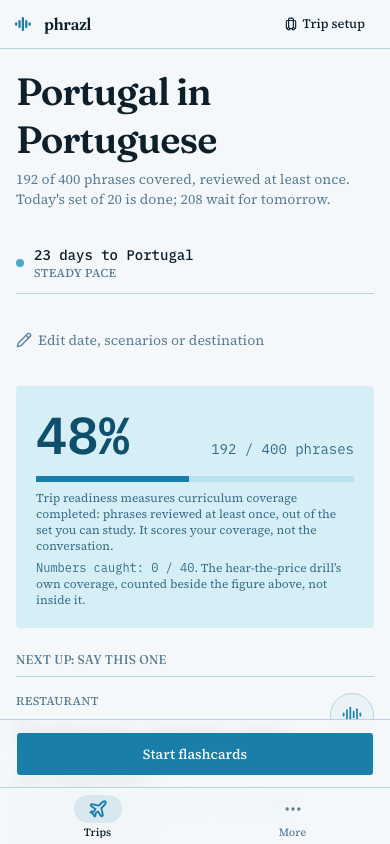
No. The readiness bar is labelled as curriculum coverage completed and it moves when you grade phrases in flashcard, listen and repeat or fill in the blank, and when you catch numbers in the hear-the-price drill. Listening hands-free is the repetition pass, so grade a sitting on the screen afterwards if you want the number to reflect it.
Does the walk check my pronunciation?
Nothing is listening to you on the walk. The speaking check lives in listen and repeat on the screen, and it is not something to plan your week around yet: you tap the mic, say the phrase, and where your browser's recogniser plays along it highlights which words of the phrase came through and plays your attempt back beside the phrase clip. On plenty of phones, iPhone included, it registers nothing you say, and where a browser has no recogniser the screen tells you so rather than leaving you tapping a dead mic. When it does run, your browser does the recognising, the attempt is held in the page's memory only while that card is open, and no recording reaches or is stored by Phrazl.
Does Phrazl record that I listened?
It records one milestone when a listen walk starts and one when it finishes, against that trip, as part of the funnel record it keeps to see where travellers stop. There is no audio of you involved and nothing goes to a third-party analytics service. The article on what Phrazl records lists every milestone it holds.
Related
- Count every step from trip setup to paid pack
Phrazl writes one milestone per trip at each step between setting up a trip and buying a pack, on the web or in the phone app.
- Delete your account
How to delete your Phrazl account from the account screen, what goes in the same transaction, and what is kept afterwards, including a gift code you bought or opened.
- Export your data
How to export your Phrazl data: a JSON file of everything held about you, downloaded from your account screen.
- Free 20-phrase preview gate before requiring purchase
How Phrazl's free preview works: five phrases at /try before you make an account, then the first 20 phrases of the trip you set up, and what happens at phrase 20 when the rest of the curriculum needs a one-time purchase.
- Getting started with Phrazl
The walk-through from your first look at Phrazl to the first phrases you say out loud: destination, departure date, three of the nine situations, the sounds primer, your free 20 phrases, one round of practice with the mic.
- How the SM-2 review schedule compresses to your departure
How Phrazl's SM-2 spaced repetition scheduler works, how it compresses review intervals so every phrase comes back before your departure date, how the phrases you mark as mattering most are served first, and how to re-pace it when the flight moves.